
Mileage Tracking Apps vs. Manual Logs: Which Is Right for You?

If you could have shown a commercial driver a decade ago what their profession looks like today, they probably wouldn’t have believed it. The rapid rise of gig work, hybrid jobs, and side hustles has blurred the line between personal and professional driving more than ever. Yet in the intervening years, the regulatory environment hasn’t gotten any easier to manage.
As a driver, you still have to maintain an accurate and defensible record of the miles you travel for work, whether for claiming deductions at tax time, submitting expenses for reimbursement, or satisfying government regulations.
Conventional wisdom would tell you that drivers only have two choices for recording mileage, either manual logs or electronic tracking apps. In reality, there are multiple manual or electronic methods to choose from. Pen and paper certainly fall under the manual category, but so do spreadsheet logs. On the electronic side, you can choose between a phone-based mileage tracking app or a vehicle-based automatic tracker.
Why This Comparison Matters More Than Ever
Choosing between mileage tracking apps and manual logs matters more than ever, and the two apps are not the same, since one runs on your phone and one lives in your vehicle. The IRS and other government agencies expect records accurate enough to survive an audit, and the deduction at stake grows with every mile at the current IRS standard mileage rate. If you don’t record your mileage accurately, your employer might assume your travels were for personal business, and then you don’t receive a proper reimbursement.
And this is just scratching the surface. Numerous real-world scenarios call for precise mileage logs, and if you can’t provide them, you face losing money or subjecting your business to regulatory fines. To help you find the best solution for you, this article will cut through the noise to show you what's actually required and how each tracking method holds up, so you never miss a deductible mile. In short, for most drivers who log regularly, a vehicle-based automatic tracker is the most reliable and audit-ready choice, a phone-based app is a reasonable middle option, and manual logs suit only low-volume drivers with a proven same-day habit.
What the IRS Actually Requires From a Mileage Log
When it comes to dealing with the IRS and other government bodies, the general guidance is to “keep good records.” But what does that even mean today? It’s worth finding out what the IRS actually requires from a mileage log, because that will help determine which tracking method is best for you.
Part of the reason mileage tracking can seem so vexing is that the IRS doesn’t require a specific format. Paper notebooks, digital spreadsheets, and apps are all perfectly acceptable, provided the record meets the "adequate records" standard outlined in Publication 463. To meet these IRS mileage log requirements, your records need only to capture four specific elements for every single trip:
- Mileage: The exact number of miles driven for business purposes.
- Date: The specific dates each trip occurred.
- Destination: The place (city, town, or other specific area) you traveled to for each trip.
- Business purpose: The reason for each trip, which should clearly be for business.
These entries must be contemporaneous, meaning they must be logged at or near the time the trip actually happened. Additionally, you must track your total annual mileage, combining both personal and business trips, to accurately calculate your deductible portion. This IRS-compliant mileage log supports both IRS methods, the standard mileage rate and actual expenses, so a complete record protects your deduction either way.
Pro tip: You may have heard that the Cohan Rule allows you to estimate lost business expenses. While this is true for some specific records in tax court proceedings, the Cohan Rule does not apply to mileage. Reconstructing mileage logs based on guesses and estimates is therefore incredibly risky.
Manual Mileage Logs: How They Work and Where They Break Down
For the vast majority of commercial driving, the manual business log kept in a notebook and stored in the glovebox was the standard. In the early days of this century, as laptops and other mobile devices became more prevalent, a well-formatted Excel spreadsheet wouldn’t have been out of the norm.
Either way, this traditional approach does have some advantages. It requires zero setup, except for maybe the initial work to create an Excel template. For highly disciplined record-keepers with a low volume of business trips every year, these manual methods can still work just fine.
However, over the course of a full tax year in the modern era, most drivers will find that manual logs fail in highly predictable ways. Some root causes of failure include:
- Human error: Transposed odometer digits or messy handwriting can ruin a record's accuracy.
- Memory gaps: Waiting days or weeks to write down trips from memory inevitably leads to mistakes, and potential violations of the Cohan Rule.
- Physical damage: Paper logs are easily lost, spilled on, or misplaced.
- The "insignificant trip" trap: Drivers often forget to log short travels because they’re not worth the effort. However, these miles can add up over the course of a year.
Falling prey to any of the above failures can mean you miss out on significant amounts in reimbursements or tax deductions. It can also cost you in an audit. When a log fails to meet the adequate records standard, the IRS can disallow the mileage deduction entirely, because the burden of proving each trip falls on you rather than on the agency. A disallowed deduction can lead to back taxes, interest, and penalties, and for anyone claiming reimbursement, unsubstantiated miles can be treated as taxable income. This is why a reliable, contemporaneous record matters long before you ever face a review.
Mileage Tracking Apps: Phone-Based vs. Vehicle-Based Tracking
Fortunately, drivers now have numerous mileage tracking apps to choose from. However, two very different types of apps often get conflated, even though they function very differently.
Phone-Based Tracking: Convenient but Not Foolproof
Phone-based apps use your smartphone's GPS receiver and sensors to detect movement. They run in the background, logging your location and total miles traveled. While these apps are certainly convenient, as most of us have our phones on us all the time, they share a critical weakness with manual logs, in that they rely on your phone being with you, charged and functional.
Say you forget your phone at home. Maybe its battery dies. Or it could lose GPS or cellular connectivity. These are just some of the reasons that the app could stop functioning. This leads to trips not being tracked in real time, and most don’t allow you to reconstruct mileage logs.
Vehicle-Based Tracking: The Reliable Electronic Method
A vehicle-based automatic mileage tracker offers the same benefits and convenience of a phone-based app. But since it is installed in your car and draws power from the vehicle electrical system, it doesn’t share the same failure points as manual logs and phone-based tracking.
Vehicle-based trackers that plug into the standard OBD-II port are particularly convenient. Unlike some hardwired or battery-powered alternatives, installation is a simple matter of plug-and-play. As soon as the engine turns on, every trip is logged automatically. And even though you may view your mileage logs in a smartphone app, the tracking itself is completely independent of your phone's battery life, signal, or presence.
While both phone-based and vehicle-based apps beat manual logs in terms of consistency and accuracy, only vehicle-based tracking removes the risk of human error or phone failures. To make sure you get the right app, just ask yourself this question before making a purchase:
Does this app depend on my phone being charged, running, and in the car with me, or does it track the vehicle itself?
Head-to-Head: Accuracy, Effort, and Audit-Readiness
The table below compares mileage tracking apps vs manual logs across the factors that decide an audit, scoring the three main methods side by side on accuracy, effort, audit-readiness, cost, and categorization.
How to Choose the Right Method for Your Situation
Once you understand the pros and cons of manual and app-based mileage tracking, choosing the right method for your driving situation is straightforward. Just follow these three steps:
- Estimate your trip volume: Are you an occasional driver heading to one or two meetings a month, or a high-volume driver managing daily routes? Unless you rack up a very small number of miles per year, and especially if you have missed logging a trip before, an electronic solution is likely to be the better choice.
- Assess your daily routine honestly: Be realistic about your own daily habits. If you are not confident you will keep up with manual logging at any level, choose an app-based method. On the other hand, if you frequently close background apps on your phone or let its battery die, a phone-based app will still likely fail for you at some point.
- Check export formats: For electronic methods, ensure your app allows you to export reports that clearly show the date, destination, purpose, and mileage so you are fully IRS-compliant.
Most drivers will make their choice based on these criteria:
- Choose manual logging only if you have genuinely low, occasional business driving and already possess a proven, ironclad habit of logging data the same day.
- Choose a phone-based app if you have a moderate annual trip volume and you prioritize the convenience of an app over manual tracking.
- Choose vehicle-based tracking if you log a high volume of miles, receive reimbursements, or you simply like the idea of always-on electronic logging, regardless of your phone’s status.
Think of the above as what you should do. Below is what you should not do:
- Attempt to reconstruct months of trips from memory right before filing taxes, as this is a massive audit red flag.
- Assume any software labeled "automatic" removes all risk, without checking if it relies on your phone's battery.
- Fail to separate business and personal mileage as the trips happen, creating a nightmare of cleanup work when managing mileage tracking for taxes.
- Rely on your employees to self-report their miles without any verification (if you are a business owner or manager).
What to Expect from the Bouncie App
Unless your business travel is extremely limited, a vehicle-based mileage tracking app will likely be your best option. The reliability, accuracy, and audit-readiness are hard to beat, especially when you consider the gaps that inevitably occur with manual tracking or having to depend on your smartphone’s battery with a phone-based app. For drivers of all backgrounds, Bouncie is the automatic mileage tracker that does it all.
The Bouncie platform includes a plug-and-play OBD-II GPS tracker and a companion smartphone app. After plugging Bouncie into the standard diagnostic port under your dashboard and activating it in the app, it logs everything automatically, capturing the date of your trip, the exact route you took, and precise mileage. And because Bouncie uses cellular networks to transmit data to the cloud, you never have to worry if your phone is present, charged, and running an app in the background.
When it’s time for expense reporting or tax preparation, Bouncie’s Trip Tag feature allows you to categorize every journey as business or personal. You can then generate a year-end report built exactly for tax and reimbursement use. Or, if you prefer, you can export your trip data in standard formats for use in other software. You can even leverage the Bouncie API to automatically import the data into other business apps, such as spreadsheets and databases.
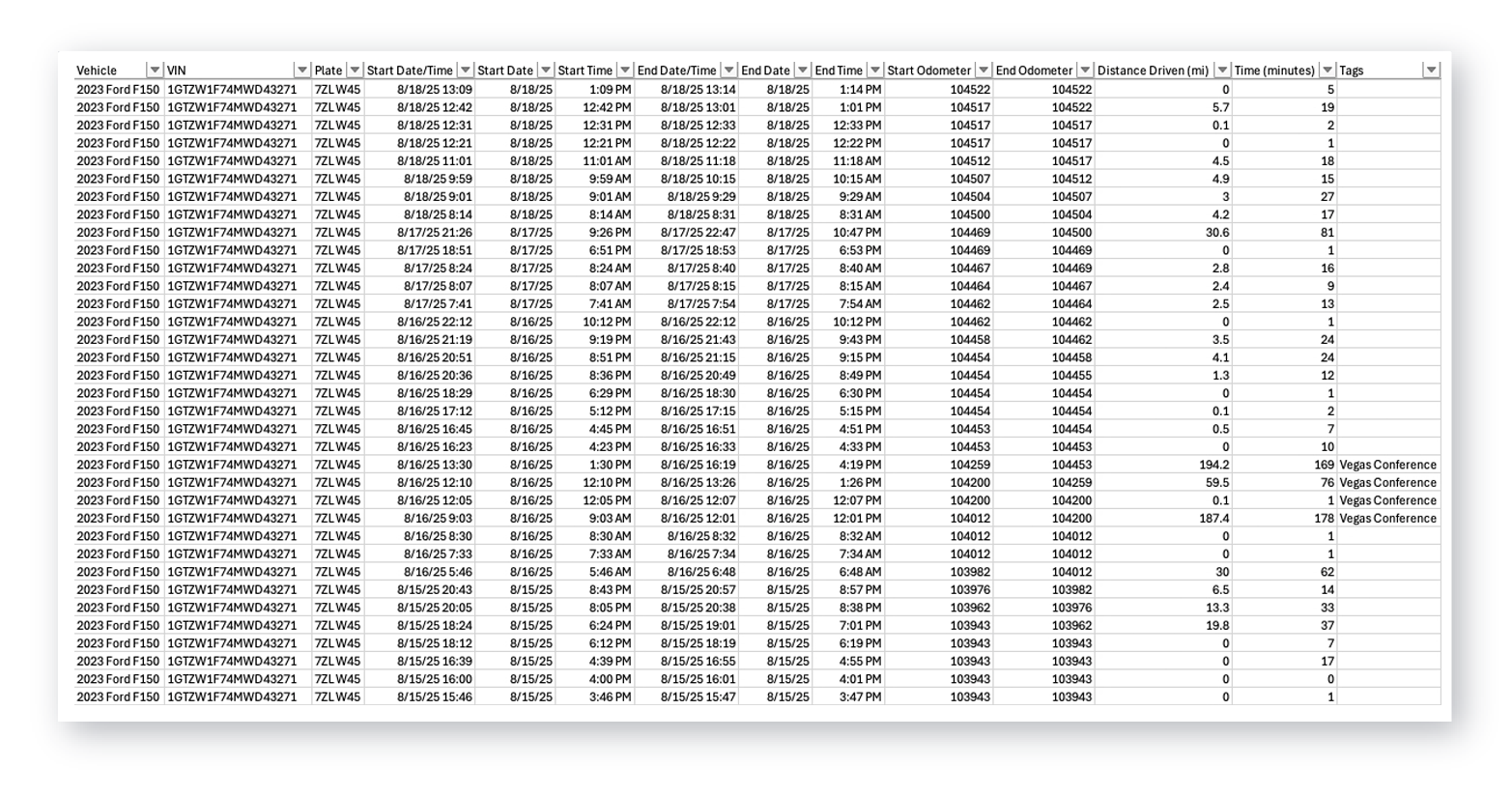
Whether you take your personal vehicle for the occasional business trip or you manage an entire fleet, you can expect hassle-free, precision tracking from the Bouncie app.
Frequently Asked Questions
Does the IRS require a specific mileage log format?
No. The IRS does not mandate any particular format, so a paper notebook, a spreadsheet, or an app all qualify, as long as the record meets the adequate records standard in Publication 463. Every trip still needs the date, the mileage, the destination, and the business purpose.
Can I recreate my mileage log at the end of the year if I forgot to track trips?
You should not rely on this. Mileage records must be contemporaneous, which means logged at or near the time of each trip, and the Cohan Rule that permits estimates for some expenses does not apply to mileage. Reconstructing months of trips from memory is a common audit red flag.
Is a phone-based mileage tracking app accurate enough for taxes?
It can be, as long as the app is running and your phone is present, charged, and connected. The weakness is that any forgotten phone, dead battery, or lost signal creates a gap, and most phone apps cannot rebuild the trips they miss. That gap is the main reason some drivers prefer a vehicle-based tracker.
Do I have to track personal miles too, or only business miles?
You need both. Calculating your deductible portion requires your total annual mileage, so you record personal and business trips and then separate them. Tagging each trip as business or personal as it happens is far easier than sorting it out at tax time.
What is the difference between a phone-based and a vehicle-based mileage tracker?
A phone-based app uses your smartphone sensors and depends on the phone being with you and working. A vehicle-based tracker plugs into the car and logs every trip on its own, independent of your phone's battery or signal.
Mileage Tracking for Today’s Drivers
When someone mentions mileage tracking, the old logbook in the glovebox is probably the first thing that comes to mind. But today, the technology has evolved to accommodate drivers of all types, including employees who need reimbursement for a couple of business trips a year, those who drive every day, gig workers, and everything in between.
There’s no need to manually track your miles when you have a faster and more accurate option available. Bouncie is a vehicle-based tracking app that automatically logs key data, whether you have your phone in the car or not. If you want the bigger picture beyond mileage, our guide on how to track my car covers location, alerts, and everyday oversight. To get started, learn more about the Bouncie GPS tracker.